How to read any web page or PDF aloud with ElevenLabs voices in Chrome
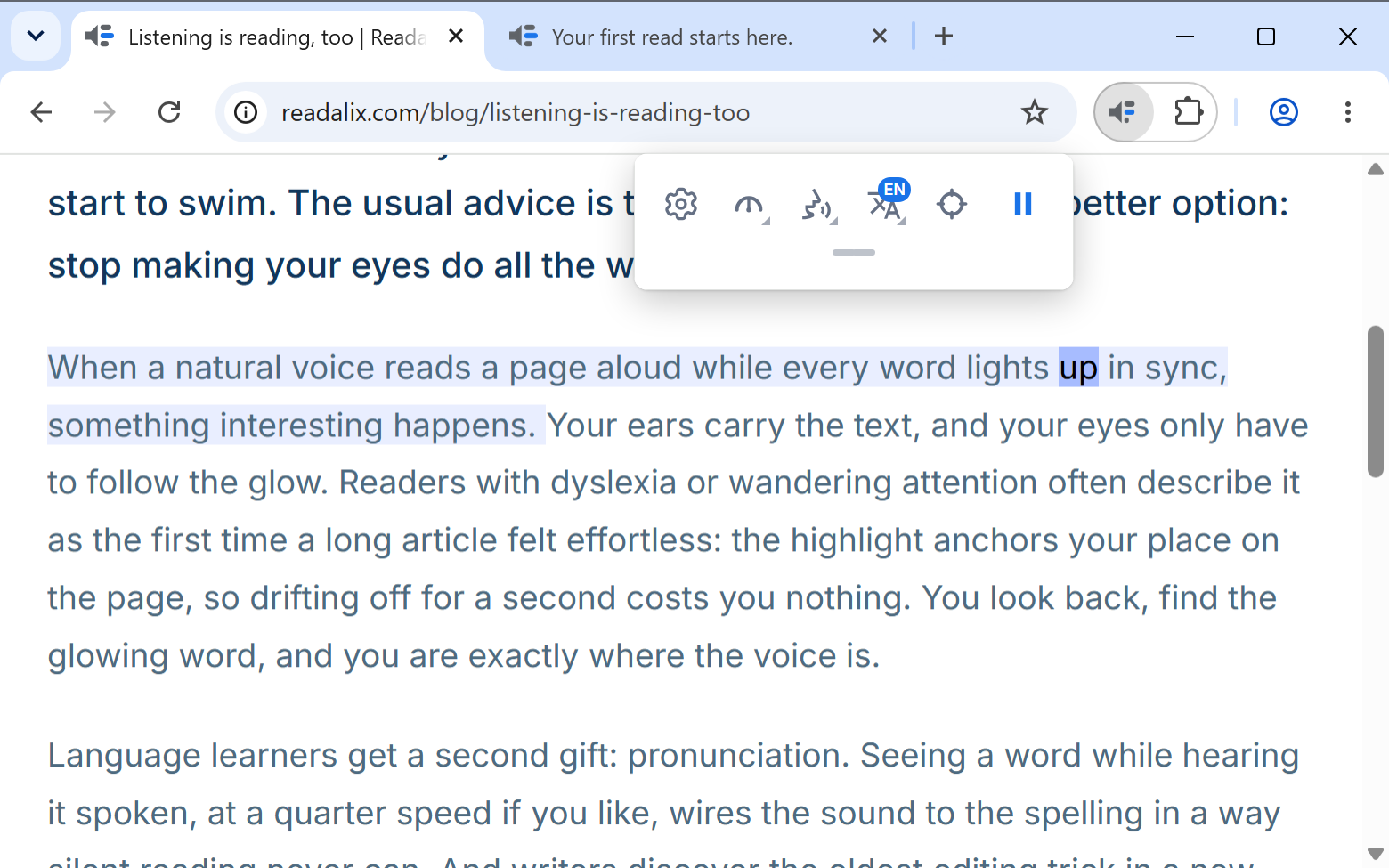
ElevenLabs makes some of the most natural text-to-speech voices you can listen to today. With Readalix, those voices read whatever you open in Chrome: articles, PDFs, Google Docs, Word documents, even the reply you are typing, and every word lights up as it is spoken.
Readalix works with your own ElevenLabs API key. Paste it once, and every voice in your ElevenLabs account joins your voice list, the ones you cloned included. ElevenLabs has a free plan, so you can try all of this without paying anyone. Setup takes about two minutes, and this guide shows every click.
What you need
- Readalix in Chrome.Free on the Chrome Web Store, with no account and no sign-up.
- An ElevenLabs account.The free plan is enough to start: it comes with 10,000 credits every month.
- Two minutes.Five short steps, each one pictured below.
Turn on ElevenLabs voices, step by step
In the pictures, each control you need is ringed and numbered, and the text names it with the same number, like this: 1.
Step 1: Open the Readalix settings
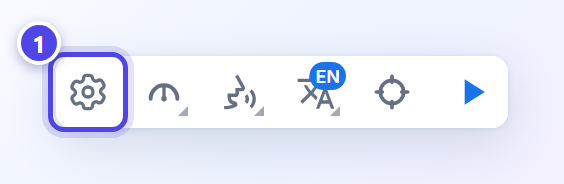
Click the Readalix icon in Chrome’s toolbar. If you cannot see it, it is in the puzzle-piece menu, and pinning it keeps it in sight. In the small toolbar that opens, click the gear 1 to open Settings.
Step 2: Open the voices of your language
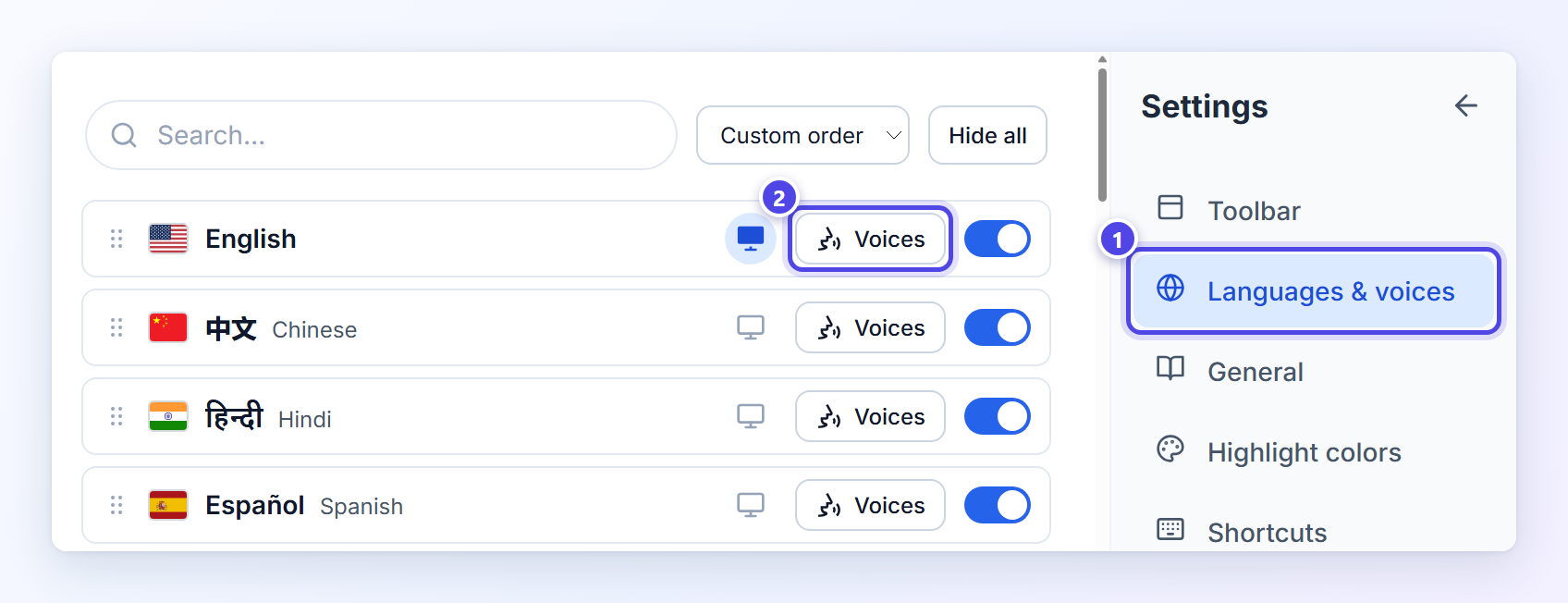
In the menu on the right, choose Languages & voices 1. Each language has a row of its own: click Voices 2 on the language you want to hear. You only do this once, because the key you add next works for every language ElevenLabs speaks.
Step 3: Choose ElevenLabs and get your free API key
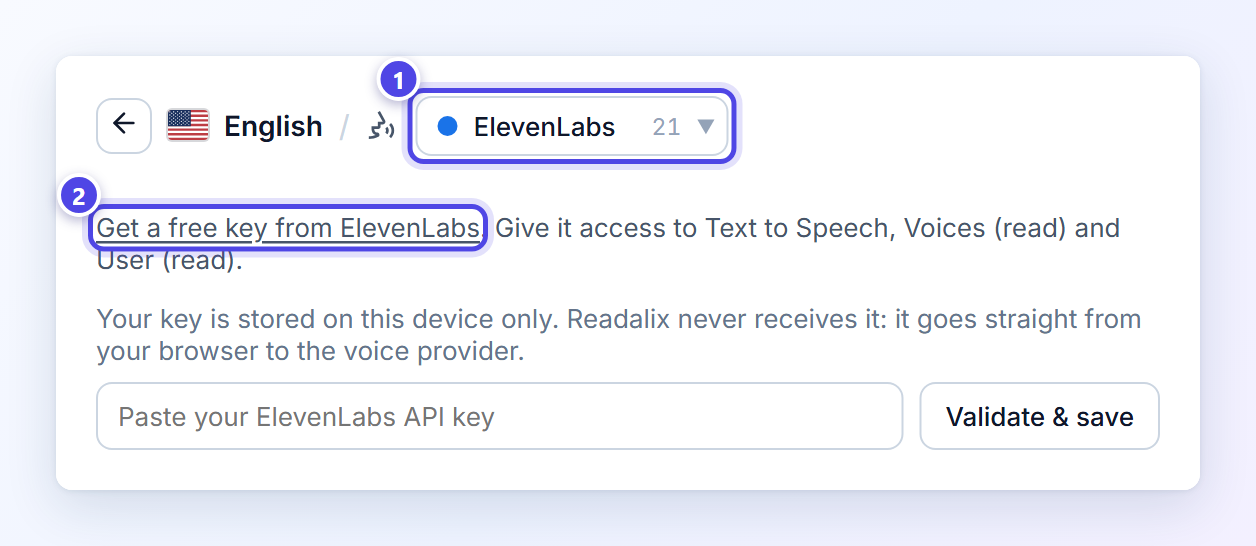
At the top of the voice list, set the source picker to ElevenLabs 1. Readalix asks for your key, and the link above the box, Get a free key from ElevenLabs 2, opens the API keys page of your ElevenLabs account.
On ElevenLabs:
- Sign in, or create a free account.
- Create a new API key and give it a name you will recognise, such as Readalix.
- Give the key the three permissions Readalix needs, because new keys are restricted: Text to Speech (access), Voices (read) and User (read).
- Copy the key. ElevenLabs shows it only once.
Each permission has a job. Text to Speech lets the voices speak. Voices (read) lets Readalix list the voices in your account, your own clones included. User (read) lets it show how much of this month’s credits you have used. ElevenLabs also lets you set a credit limit on the key, so no read can ever spend more than you planned.
Step 4: Paste the key and press Validate & save
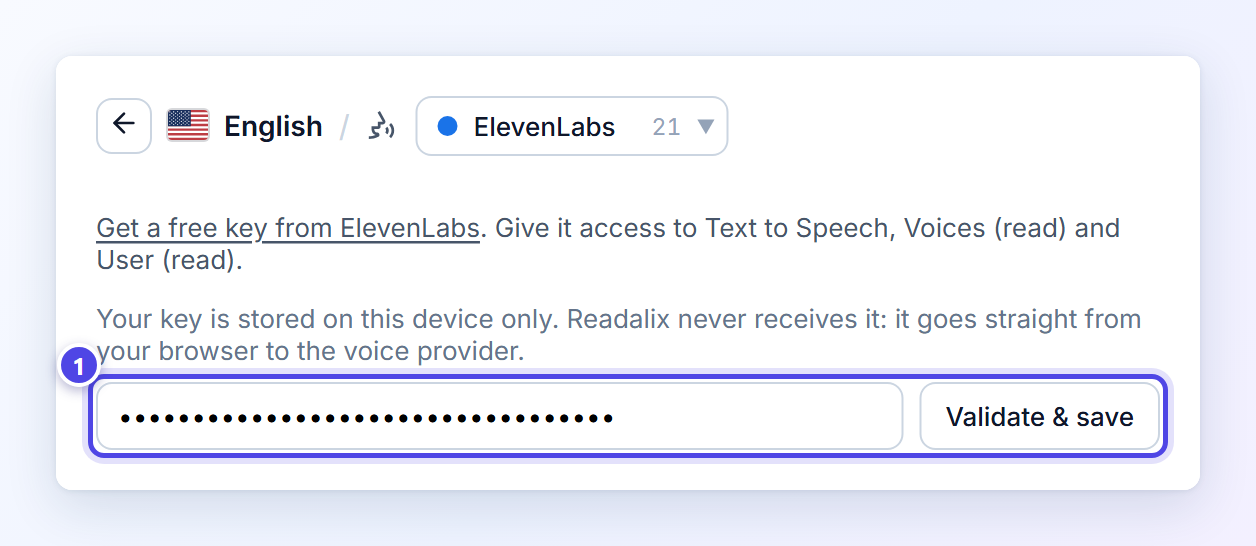
Back in Readalix, paste the key into the box and press Validate & save 1. Readalix checks the key with ElevenLabs before saving it, so a typo shows up right away instead of on your first read. The key is stored on this computer only: it is never synced and never sent to Readalix.
Step 5: Pick your ElevenLabs voice
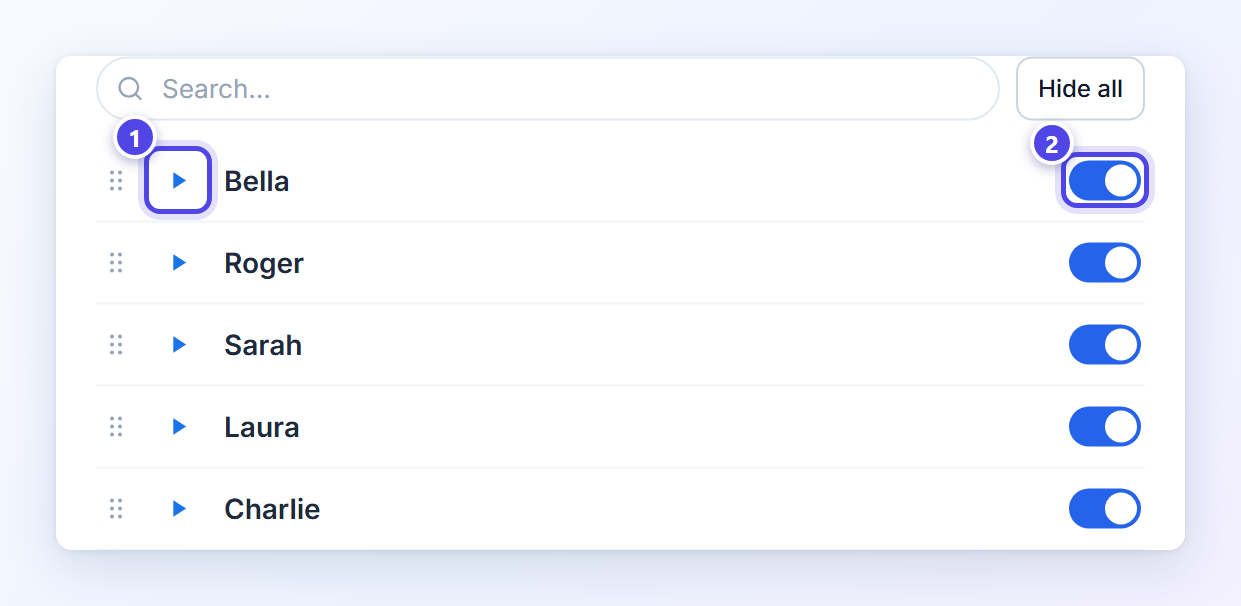
Once the key is saved, the voices of your ElevenLabs account fill the list: the 21 every account starts with, plus any you have cloned or added to My Voices. Press play 1 to hear a voice before you choose it. Each sample is made once and kept, so playing it again costs no credits. The switch 2 decides whether a voice appears in the toolbar’s voice menu, so that menu can hold just your favourites.
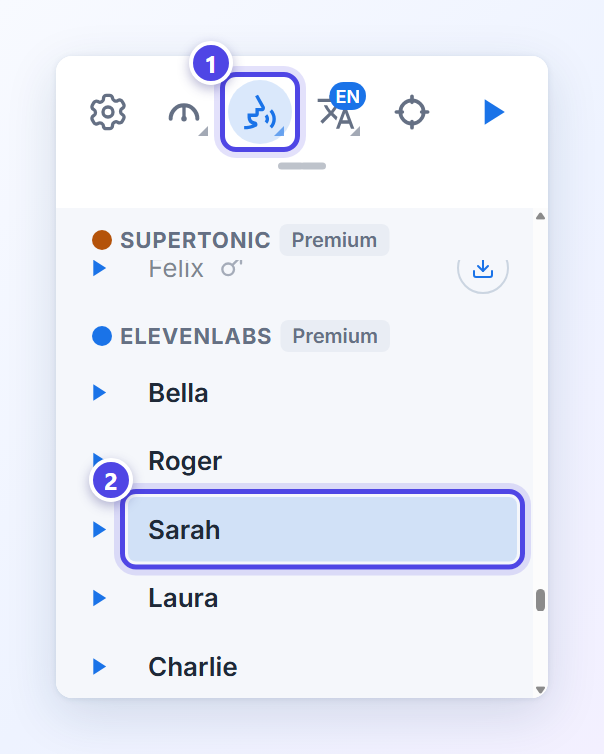
To read with a voice, open the toolbar’s Voice button 1 and pick it 2. ElevenLabs has a group of its own there, beside your other voices. You can even switch in the middle of a read: the sentence you are in starts again in the new voice. Now select some text, or press play with nothing selected, and listen.
Readalix fetches your voice list when you save the key. To bring in a voice you add to ElevenLabs later, remove the key with the bin icon and save it again.
Which ElevenLabs model should you choose?
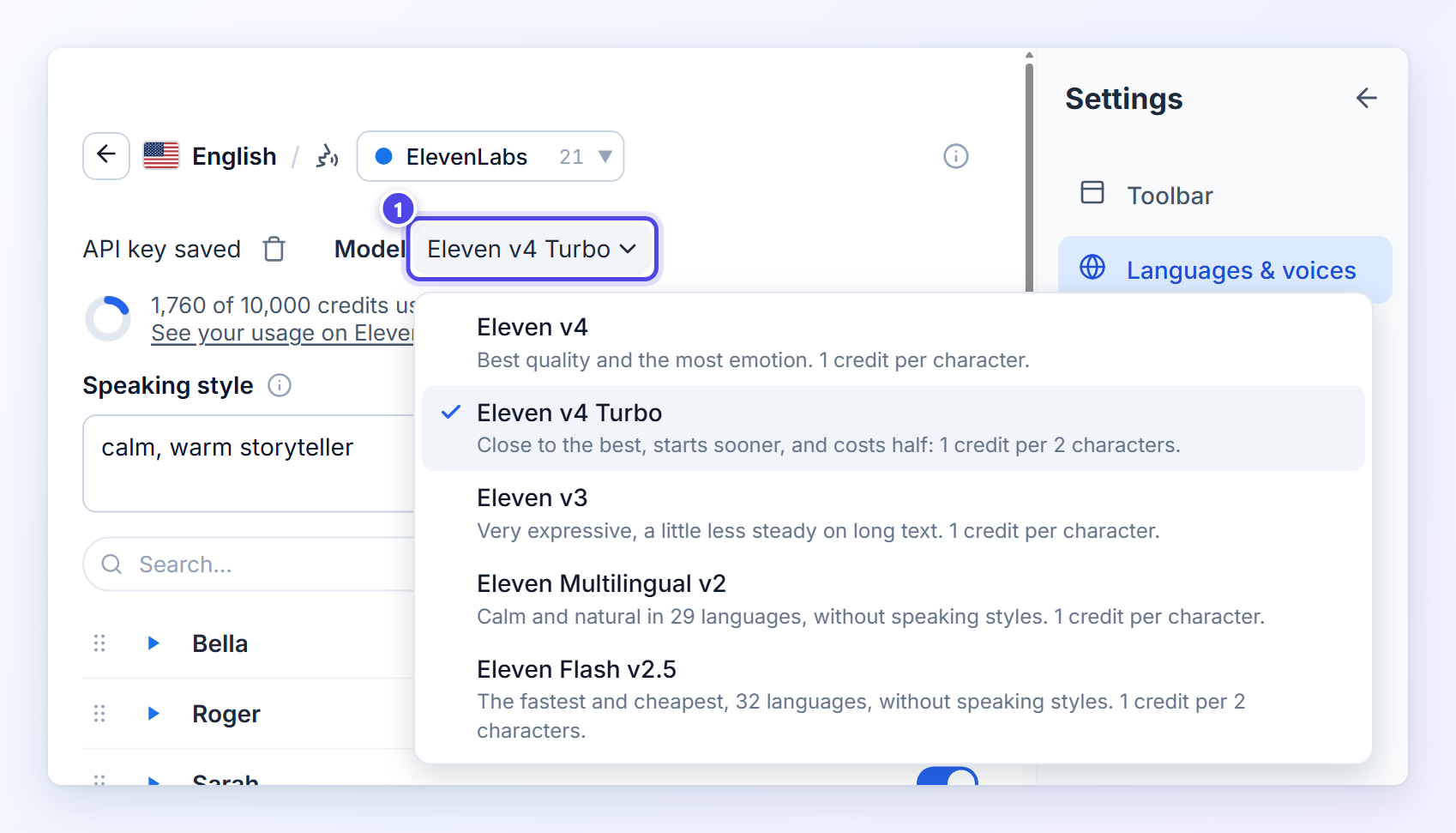
The Model menu 1 sits next to your saved key and lists every model with one line on quality and one on cost, so you can switch at any time and compare by ear. Readalix starts you on Eleven v4 Turbo: it sounds close to the best and costs half as much.
| Model | Choose it for | Cost | Speaking style | Languages |
|---|---|---|---|---|
| Eleven v4 | The best quality and the most emotion | 1 credit per character | Yes | 85 |
| Eleven v4 Turbo | Nearly the best, starts sooner. The default | 1 credit per 2 characters | Yes | 85 |
| Eleven v3 | Very expressive reads. A little less steady on long text | 1 credit per character | Yes | 74 |
| Eleven Multilingual v2 | Calm, natural narration | 1 credit per character | No | 29 |
| Eleven Flash v2.5 | The fastest start and the lowest cost | 1 credit per 2 characters | No | 32 |
The model is one setting for every language. If the one you chose cannot read the language in front of you, Readalix uses Eleven v4 Turbo for that read, or the best model that speaks the language, so a read never fails because of the model. The menu only lists the models that read the language you are looking at.
A simple rule: start on v4 Turbo. Move up to v4 for something you want to hear at its best, like a long article read as an audiobook. Move down to Flash v2.5 when you get through a lot of text on a small plan.
Give the voice a speaking style
This is where ElevenLabs in Readalix goes beyond a plain read-aloud button. On Eleven v4, v4 Turbo and v3, the Speaking style box 1 tells the voice how to perform: describe a mood or a character in a few words, and every sentence is read that way. Out of ideas? Click the small (i) beside the label and press Try a random style 2 as often as you like.
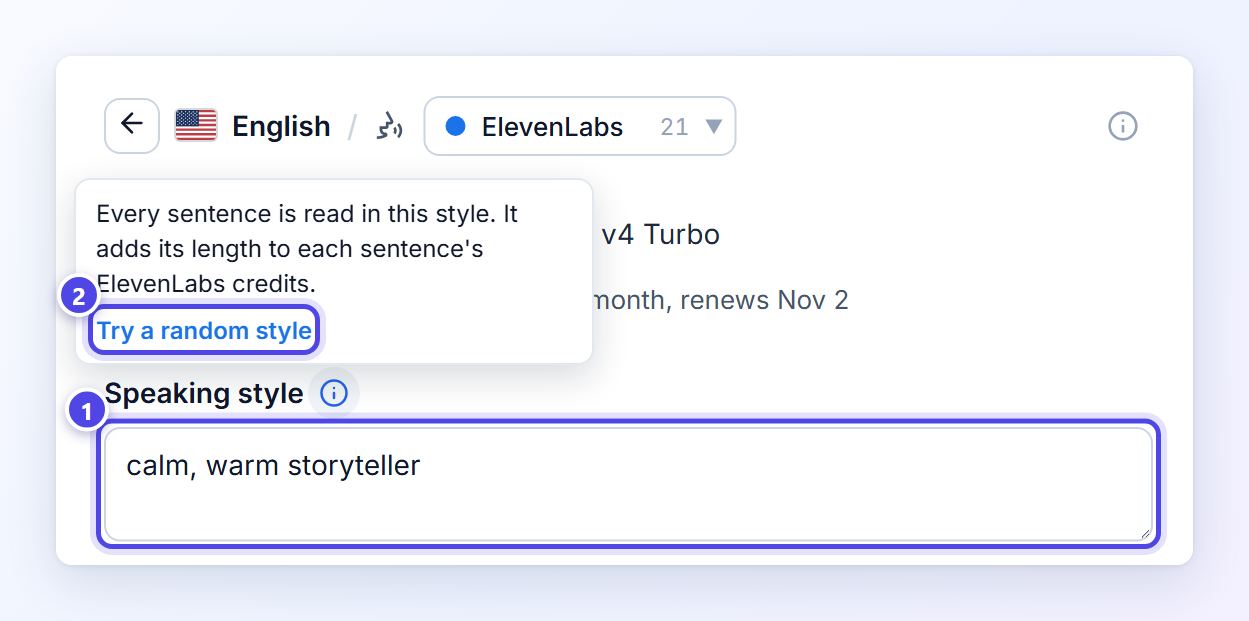
A few of the styles it suggests: calm, warm storyteller, clear, steady news anchor, sleepy bedtime story, whispering a secret, dramatic movie trailer narrator and gruff old sea captain. The same article sounds like a different read in each one.
Keep it short. The style goes along with every sentence and counts toward that sentence’s credits, so a few words do the job for very little. It is saved as soon as you leave the box and applies from the next sentence, so you can change it while the voice is reading. Eleven Multilingual v2 and Flash v2.5 read without a style, and the box greys out while one of them is chosen.
See how many credits you have left
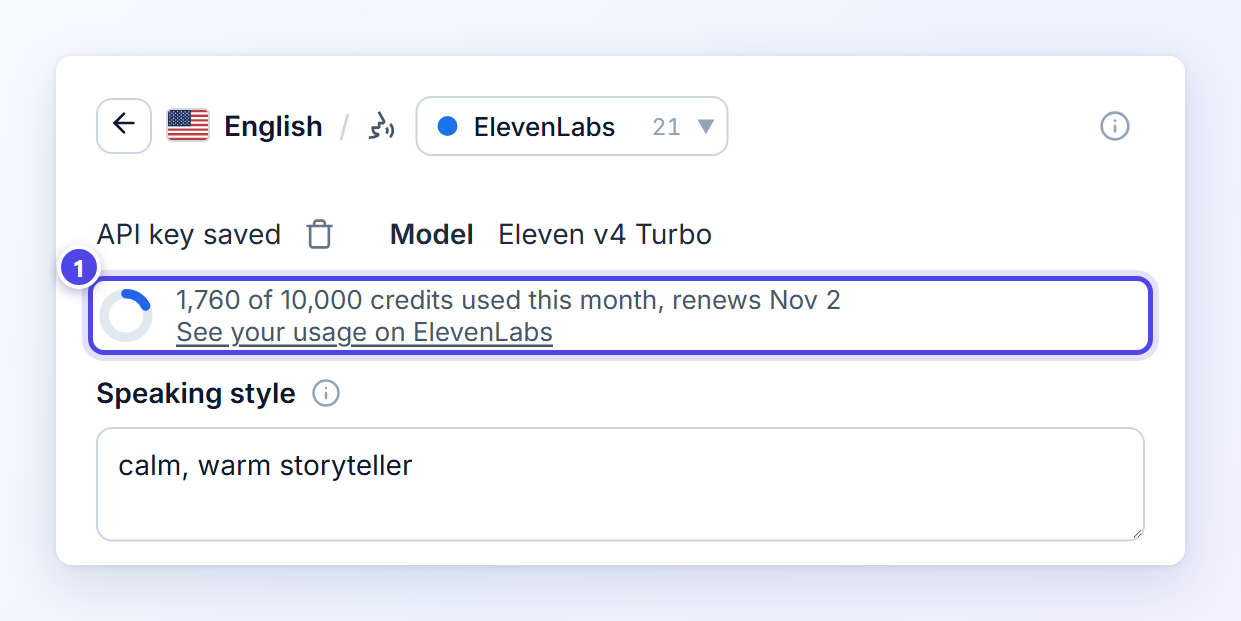
Under your key, a small ring 1 shows how much of this month’s ElevenLabs credits you have used, with the figures and the renewal date beside it. It turns amber at 80% and red at 95%, so you see a month running low before it runs out. See your usage on ElevenLabs opens the full breakdown on their site. The figures need the key’s User (read) permission; without it, you still get the link.
If your credits do run out during the month, Readalix tells you in plain words and offers both ways forward: pick another voice and keep reading straight away, or add credits on ElevenLabs.
Why listen to ElevenLabs through Readalix
ElevenLabs gives you the voice. Readalix decides where that voice can read, and how easily you follow along:
- It reads wherever you are.Web pages, the box you are typing in, Chrome’s own PDF viewer, Google Docs, Word and PowerPoint for the web, and Google Slides, plus the text inside iframes and shadow DOM that most tools skip. No copying and pasting into another app.
- The highlight stays in the page.Readalix tints the sentence and lights up each word right where the text sits. Many read-aloud extensions copy the text into a player, a side panel or a reader view, so your eyes have to leave the page. Here, links stay links and the layout never moves. And because ElevenLabs reports when every character is spoken, the word highlight lands exactly on the word you hear.
- Nothing pops up when you select text.No floating button and no toolbar stuck to the page. Readalix waits until you ask, with the toolbar, a keyboard shortcut or the right-click menu. Here is why.
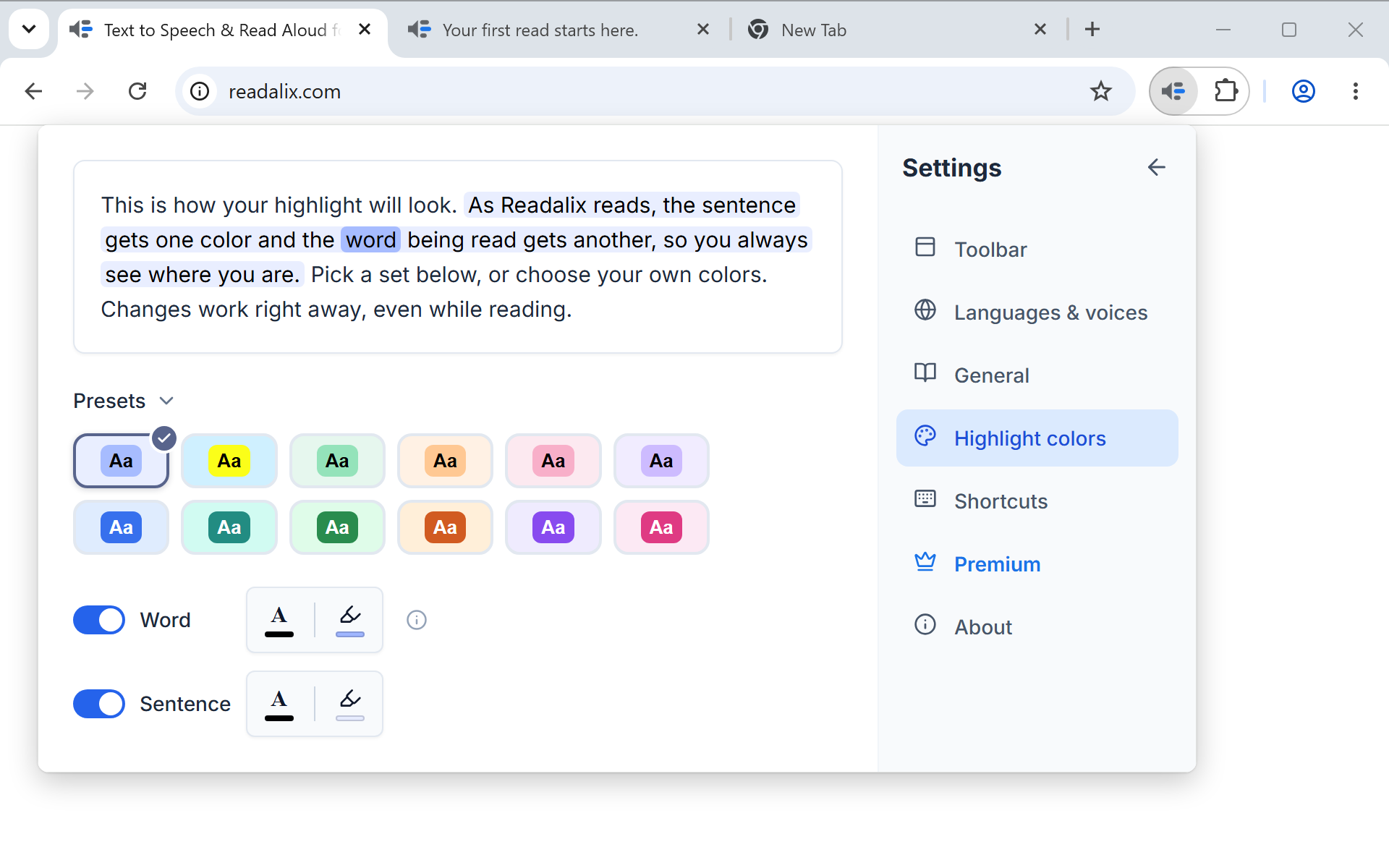
- Your colours, your way.Choose one of twelve ready-made colour sets or mix your own, and turn off the word or the sentence highlight if you only want one of them. Changes apply to the read already running, so you can compare while you listen.
- A PDF reader built in.Open a PDF in the Readalix reader to hear it with your own highlight colours, word and sentence together. Scanned pages are recognised on your computer and read too, and you can fill in forms, add highlights, drawings and notes, search, zoom, print and download.
- Every great voice in one place.ElevenLabs sits beside Gemini and OpenAI (with your own keys), 322 Microsoft voices that need no key, and Piper, Kokoro and Supertonic voices that run on your own computer, work offline and keep your text private. Switch between them from the same menu, even mid-sentence.
What it costs
ElevenLabs bills your ElevenLabs account, never Readalix. Its free plan includes 10,000 credits a month: about 20,000 characters on Eleven v4 Turbo or Flash v2.5, roughly 20 minutes of listening, or half that on the other models. Paid ElevenLabs plans add more credits.
On the Readalix side, ElevenLabs is one of the premium voices that share a free allowance of 20,000 characters a day. When that runs out, the read carries on in a browser voice instead of stopping, and the allowance is back the next day. Premium removes the daily limit for $15 a year, or $40 once.
Your key and your text stay yours
Your ElevenLabs key is stored on this computer only. It is never synced to your other devices, never sent to Readalix, and goes from your browser straight to ElevenLabs. While a voice reads, only the sentence being spoken (and your speaking style, if you set one) is sent to ElevenLabs to be turned into speech. When you want nothing to leave your computer at all, switch to an on-device voice such as Piper, Kokoro or Supertonic. The privacy policy has the details.
Questions people ask
- Can I use ElevenLabs with Readalix for free?Yes. Readalix is free to install, and the ElevenLabs free plan gives you 10,000 credits a month. You only pay if you want more: more credits from ElevenLabs, or no daily limit from Readalix Premium.
- Can I read with my own cloned voice?Yes. Voices you clone or add to My Voices in ElevenLabs appear in Readalix next to the standard ones, as long as your key has the Voices (read) permission. Cloning itself needs a paid ElevenLabs plan.
- Which languages can ElevenLabs read?Up to 85, depending on the model: Eleven v4 and v4 Turbo read the most. Readalix works out the language of what you are reading and offers only the models that speak it.
- What happens when my ElevenLabs credits run out?Readalix tells you, and you can pick any other voice to keep reading at once. Your credits renew on the date shown under your key.
- Does it work on PDFs and Google Docs?Yes. ElevenLabs voices read everything Readalix reads: PDFs in Chrome’s viewer or in the Readalix reader, Google Docs, Word, PowerPoint and Google Slides on the web, and any ordinary page.
- Readalix says a voice is not available to my account.Some ElevenLabs voices can only be used through the API on a paid ElevenLabs plan. Pick another voice from the list, or check that voice in your ElevenLabs account.
Two minutes of setup, and some of the best voices around read whatever you open in Chrome, while your eyes follow every word. Listen to the article you meant to read, the PDF you keep putting off, or the email you just wrote, in a voice you actually enjoy.
Readalix is an independent extension, not affiliated with ElevenLabs. ElevenLabs’ plans, credits and models were checked on elevenlabs.io in October 2026 and may change, so their pricing page has the current figures.
Hear this page in a natural voice
Readalix is free, needs no account, and its on-device voices never send your text anywhere.
Add to Chrome