Release notes
What’s new in Readalix
Everything worth knowing about each release, newest first.
1.18.5 14 October 2026
Improved
- Switch to another voice: when a Microsoft voice can’t be reached, one click keeps reading in another voice, from where it stopped. How it works
Fixed
- Microsoft voices in Chrome: they stopped reading when Microsoft changed how browsers connect, and they read again.
1.18.0 11 October 2026
New
- Your voices: record 15 seconds of yourself reading, or pick an audio file, and Readalix reads any English or German page in that voice, made on your computer. How it works
Improved
- Voice settings from the voice list: each voice group now has a gear that opens its settings in one click, and a crown marks the premium ones. How it works
- API keys: Voice providers is now called API keys, opens on the service you last used, and a saved key takes you straight to its voices. How it works
Fixed
- Reads that stopped as they started: once the day’s premium allowance was used up, a read started from a picked spot in Google Docs could stop the moment it began.
- Read with Readalix on PDFs that sites open themselves: the right-click item was missing on a PDF a web app builds and opens, and it now reads it.
- Language names in Chinese and Brazilian Portuguese: the extension now names each language in your interface language instead of in that language’s own words.
1.17.0 9 October 2026
New
- Dictation: speak, and Readalix writes down your words on your own computer, ready to copy, or drop in an audio file to get its words. How it works
Improved
- Voice providers: Gemini, OpenAI and ElevenLabs keys now share one page in Settings, so adding a key takes two clicks. How it works
- Read any PDF from the right-click menu: Read with Readalix now works on PDFs inside web pages too, and with nothing selected it reads the whole document. How it works
- Free Microsoft voices in Edge: in Microsoft Edge, Readalix reads with Edge’s own natural voices, free and without a daily limit, instead of listing the same voices twice. How it works
Fixed
- Microsoft voices keep reading: a read could stop mid-page when Microsoft’s speech service briefly dropped the connection. It now waits a moment and carries on.
1.16.0 5 October 2026
New
- ElevenLabs voices: add your ElevenLabs API key and read with its lifelike voices, your own cloned ones included, with every word highlighted. How it works
- Dark theme: the toolbar, Settings and the PDF reader can now be dark, follow your computer, or stay light. How it works
1.15.0 3 October 2026
New
- Your premium voice, offered back: if you switched to a browser voice when the day’s free minutes ran out, the toolbar offers to switch you back the next day, once they return. How it works
Fixed
- Opening the toolbar no longer stops a read: a browser voice reading a page could stop a few seconds after you opened or closed the Readalix toolbar. It now keeps reading.
1.14.1 1 October 2026
Improved
- Fair warning when reading would stop: if no free voice on your computer can read your language, the half-used banner says reading stops once the allowance runs out, while you still have time to choose. How it works
Fixed
- Copy-protected pages read their main text: on e-book sites that block text selection, Play now reads the chapter itself, starting at the reading area, instead of only the comments.
- On-device voices that stopped now read: eight Piper voices in Portuguese, French, German and Polish that failed on almost every page now read them, and Icelandic gets four Piper voices.
1.14.0 29 September 2026
New
- Open PDFs from Google Drive in the Readalix reader: add Readalix to Drive’s “Open with” menu from the toolbar on a Drive tab, then right-click any PDF to hear it. How it works
Improved
- A failed voice download tells you why: you are offline, your network cannot reach the download server, or the disk is full, so you know whether another try will help. How it works
Fixed
- Voices now download on networks that block Hugging Face, such as in mainland China, where the Chinese Kokoro voices never finished, and so does text recognition.
- The read shortcut works inside embedded documents such as Word Online, in tabs that were already open when Readalix was installed or updated, with no reload.
- The update dot on the Readalix icon clears on every tab once you open the toolbar, not only on the tabs you reload.
- The handle for the toolbar’s second row no longer flickers when the pointer rests on its edge.
1.13.0 27 September 2026
New
- A second toolbar row you arrange yourself: Snip & read, Save and Open a PDF wait under the small handle, and any button can be dragged between the rows. How it works
- Private sites and password fields: turn Readalix off on sites like your bank, or let only on-device voices read them, and decide whether passwords are ever read. How it works
- PDF forms that fill in their own totals: in the Readalix reader, sums, dates and number formats work as you type, and a read of the document speaks what you entered. How it works
Improved
- The PDF reader starts at the page you are looking at, and a scanned PDF keeps reading while its pages are recognised, without long pauses. How it works
- Opening a PDF in the reader never loses it: a file that cannot be fetched again stays in the browser’s viewer, and the button tells you why.
- The Readalix icon spins a download arrow while a file is being saved, so you can close the toolbar and still see the job working. How it works
Fixed
- Your chosen text colour now shows on the spoken word in Google Docs, Google Slides and Word Online, and the sentence highlight in Docs and Slides is one smooth band.
- Snip & read is more dependable: its shortcut works on every keyboard layout, it reads the right area on a zoomed page, and a stalled download no longer freezes it. How it works
- Passwords stay private when you reveal them: a password shown with the eye button is kept as silent as a hidden one, on web pages and in the reader.
1.12.0 25 September 2026
New
- Snip & read: drag a box over any part of a page, a picture or a video frame included, and hear the words inside it. How it works

Two new buttons: Open a PDF and Snip & read. - A PDF reader of its own: read any PDF, scans included, with the highlight in your colours, and fill forms, highlight, draw or add text as you go. How it works
- Read the words in a picture: right-click a picture on any page and Readalix reads out the text in it. How it works
Fixed
- Play in Google Docs on a Mac works again with nothing selected, reading from where your cursor is.
1.11.0 20 September 2026
New
- Chinese voices that read on your own device: Mandarin now has offline voices of its own, with no key and no limit. How it works
Improved
- The premium card now says what you bought, warns you if a renewal fails, and lets you sign in to restore a purchase on another computer. How it works
- A note on PDF tabs explains why the highlight looks different there, since Chrome’s viewer paints it in its own purple. How it works
Fixed
- A voice that your system lists but cannot actually speak is now marked as such, instead of leaving you with silence and no explanation. How it works
- The right-click menu no longer goes stale or greys out on a page Readalix reads perfectly well. How it works
- On a PDF the right-click item no longer promises to read from here when it will read your selection.
1.10.0 18 September 2026
New
- Gemini voices: expressive cloud voices from Google, with previews you can audition before you add a key. How it works
- Tell us what is wrong from Settings, About: a message box that sends your version and voice settings along, so a problem can be reproduced. How it works
- A welcome page on install shows you how to pin Readalix and read your first sentence. How it works
Improved
- The browser voices have a new speed picker where every step sounds different, with Chrome’s own voices capped at the speed they still pronounce clearly. How it works
- Non-browser voices now play through the tab, so screen sharing, recording and the tab mute button all reach them. How it works
- A failed sentence no longer loses the whole export: it retries, logs what happened, and offers you the incomplete file. How it works
Fixed
- Changing voice partway through no longer stops the read. How it works
- Saving a page or PDF as audio or video no longer gets stuck retrying: a document whose language has no voice of its own is now recorded with the closest voice that can read it. How it works
1.9.0 14 September 2026
New
- 17 more on-device Piper voices, and Bengali, Estonian, Italian and Marathi can now be read without an internet connection. How it works
Improved
- A read that drops to a browser voice now says why: the toolbar opens with your daily limit and the upgrade option. How it works
- The upgrade card now names all six premium engines, including Microsoft and Supertonic. How it works
- An on-device voice that fails now tells you instead of stopping in silence. How it works
Fixed
- Hiding a whole engine’s voices no longer resets your other settings. How it works
- Seven Piper voices that never made a sound are gone from the list. How it works
- A cancelled or failed export no longer spends your daily allowance. How it works
- Chrome’s PDF viewer now obeys the word and sentence highlight switches, and turning one off no longer resets the other. How it works
- Microsoft voices no longer grey out after two unrelated failures hours apart. How it works
- An export no longer sticks on “working” forever when a voice engine crashes. How it works
1.8.1 12 September 2026
Improved
- The premium reminder waits until half your daily allowance is gone, so a short read no longer puts a banner under the toolbar. How it works
Fixed
- A Microsoft voice that went quiet now retries and explains itself: a read that connected and then produced nothing told you nothing at all. How it works
1.8.0 10 September 2026
New
- Pages with more than one alphabet now read right through: an English page quoting Arabic, Greek or Chinese switches to a voice that can pronounce each part instead of falling silent. How it works
Improved
- Readalix now tells you why a voice will not play: instead of a play button that does nothing, you get the reason and what to try. How it works
- A read that reaches your daily limit finishes in the voice it started in, rather than changing voice partway through. How it works
Fixed
- Toolbar buttons show their keyboard shortcut: hover the read or pick button and the tooltip names the keys. How it works
1.7.0 8 September 2026
New
- Set your own keys for every action: reading, the element picker and skipping a sentence each get their own shortcut, and any of them can be turned off. How it works
- Pick an element with the keyboard: press Ctrl+Alt+E and point at the paragraph, table or panel you want read. How it works
Improved
- Rearranging the toolbar is easier: drag an icon anywhere in the row, and put the original order back with one click. How it works
Fixed
- Four voice samples stayed silent: the preview button on those Kokoro voices now plays. How it works
1.6.0 4 September 2026
New
- Supertonic voices, 31 languages from one model: ten premium voices that each speak every one of those languages, entirely on your device after a single 398 MB download. How it works
- The element picker reaches into frames: point at an embedded article or a comment box and it now picks the element inside the frame, not the frame itself. How it works
- Right-to-left layout: in Arabic, Hebrew, Persian and Urdu the popup and its settings lay themselves out from the right. How it works
- A quiet note when Readalix updates: a dot on the toolbar icon and one row in the popup say which version you are on, with a link to what changed. How it works
Improved
- Reading speed is a slider: any speed between 0.25x and 4x, with 1x in the middle of the toolbar’s gauge instead of off to one side. How it works
- One picker for the voice source: a language’s voice list now chooses its source from a dropdown that counts the voices in each, with a search box and a description you can fold open. How it works
- Play sits under the cursor: the popup’s buttons are ordered so play lands under the toolbar icon you just clicked, and it is focused the moment the popup opens. How it works
- A page with no article still reads: when nothing on the page looks like an article, reading the page falls back to its body instead of finding nothing. How it works
- The toolbar icon shows a read is running: its sound waves pulse while Readalix speaks, and hold still the moment you pause. How it works
- A shorter About page: the version, the guide, what’s new and the privacy policy as plain rows, each showing its address on hover. How it works
- The picker shows what it will read: the element under the cursor gets an outline, and the cursor itself becomes the pick icon. How it works
- A whole row switches: in Settings, clicking anywhere on a toolbar button’s row or a highlight’s row toggles it, not just the switch at the end. How it works
Fixed
- Switching voice mid-read no longer stops the read: picking another voice while Readalix is speaking now carries on from where it was. How it works
- A frame is read in the language the toolbar shows: an epub reader, or any frame with no address of its own, no longer falls back to your global language pick. How it works
- The voice list stays usable while a model downloads: the rows no longer flicker and swallow clicks, and a reopened popup shows the download already running. How it works
- Picking something Readalix cannot read now does nothing: before, it quietly read a different part of the page instead. How it works
- Only one toolbar button runs automatically: turning it on for one button now turns it off for the others, so opening the popup does one thing. How it works
- The picker steps aside: it turns itself off while Settings is open or a file is being saved, and arms again when you go back. How it works
1.5.0 30 August 2026
New
- Step back a sentence, or skip one: the left and right arrow keys move the read one sentence at a time, from the toolbar or straight from the page. How it works
- Save a file in any voice that can make one: Piper, Kokoro, Gemini and OpenAI voices now write files too, instead of being swapped for a Microsoft voice. How it works
- Chrome’s own “Google … (Natural)” voices are back: they are offered again once Readalix has quietly checked, this browser session, that they answer. How it works
Improved
- Very long sentences are broken into readable pieces: text without full stops is cut at its commas and clauses, so the voice pauses and the tint stops covering half a paragraph. How it works
- A saved file is named after what it says: the file now always waits for Chrome’s on-device model to title it, in any language, instead of sometimes falling back to the tab title. How it works
- Every saved file credits the voice that read it: and the open-licensed voices carry their licence, with a note before you generate when that licence asks something of you. How it works
- A run-on sentence turns a page in a video: instead of shrinking to fit one screen, it is dealt evenly over as many screens as it needs, at full size. How it works
- The language and voice menus keep one order: rows no longer float to the top for being used recently, so a position stays learnable; drag them in Settings to set your own. How it works
Fixed
- Pages whose content sits in one big frame did nothing: play now finds the article inside a large frame, so viewer shells and app pages read like any other page. How it works
- Long Piper reads and files stopped partway: a long article or export in a Piper voice failed mid-way with an Aborted error; it now runs to the end whatever the length.
- A stray “|” could end a read or fail a file: a separator on its own line in a byline made the voice return nothing, which stopped the read; such fragments are now skipped.
- The voice that spoke could differ from the one named: on a site pinned to a language, the read used whichever voice was picked last anywhere, not the one the toolbar showed for that language. How it works
- Videos in some voices had no word highlight: Piper, Gemini and OpenAI report no word timings, so their files came out with only the sentence colour; the word is now marked in every voice. How it works
1.4.0 28 August 2026
New
- Save what you are reading as an MP3: a new button on the toolbar turns whatever Play would have read (the article it finds on the page, the passage you selected, a PDF, a Google Doc) into an audio file, so you can listen to it later, away from the browser. It is read by the Microsoft voices, which are the ones that can be written to a file.
- …or as a video: the same text as an MP4 that shows one sentence at a time with the spoken word lit in your own highlight colours: something you can watch, post, or hand to someone who reads along. Pick it wide for a screen or tall for a phone.
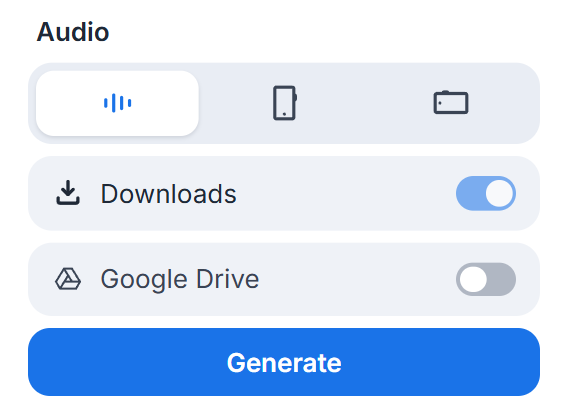
Pick audio or the video’s shape, choose where it lands, then Generate. - Send it to Google Drive: audio and video can go straight into a Readalix folder in your Drive instead of the downloads folder, or into both at once. Readalix only ever sees the files it puts there.
- PDFs previewed in OneDrive and SharePoint read aloud: open a PDF from a OneDrive or SharePoint file list and press play: it reads the document, or the passage you selected in it, with the word and the sentence highlighted in your colours. No downloading it first.
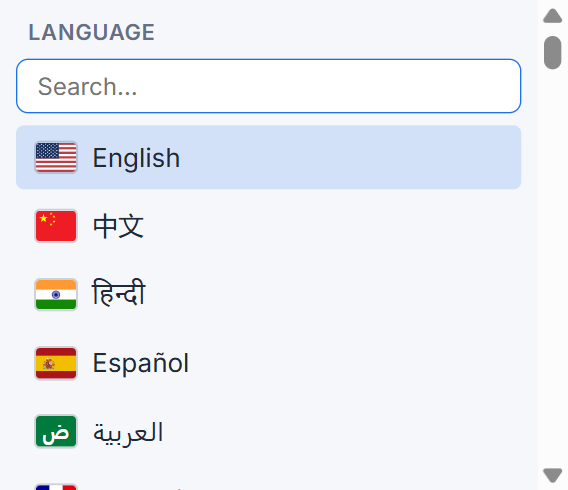
- A flag for every language: the language picker, the language settings and each language’s voice list now show the flag beside the name, so you can find the one you want at a glance. The toolbar’s language button can wear that flag too, next to the code or in place of it.
Improved
- Changing the language takes effect at once: picking a different language while something is being read now restarts the sentence you are on in that language, the way changing the voice or the speed already did, instead of waiting for the next read.
- Settings opens at the size of what you opened: short sections such as Shortcuts or Toolbar no longer open as a mostly-empty window; the window is now as tall as the section needs.
Fixed
- Reading could hang on “Preparing…” forever: certain voices offered in the list (Chrome’s own “Google … (Natural)” ones) are loaded only while Chrome’s reading mode is using them, so a voice you had picked could quietly be gone after a restart, and pressing play with it left the spinner turning with no way out but Stop. Those voices are no longer offered, and any voice that stays silent is now swapped for one that works so the reading carries on.
1.3.0 21 August 2026
New
- ChatGPT, Gemini and Claude now show where they are reading: press read aloud on an answer and Readalix highlights the word and sentence their voice is speaking, scrolling the chat along with it. Their voice, Readalix’s highlighting, on every answer, and your reading speed applies to their voice too. Code blocks are left alone, because their voices skip them. You can switch any of the three off under Settings → Reading.
- Press play and it finds the article: on an ordinary page with nothing selected, Readalix now works out where the article actually is and reads that, leaving the menus, sidebars and footer out. Nothing to select first, and the picker is still there when you want to choose a region yourself.
- Turn the word or sentence highlight off: each half now has its own switch next to its colours, so you can follow just the word, just the sentence, or listen with nothing highlighted at all.
Improved
- Reading options are easier to set: each option under Settings → Reading is now one block you can click anywhere on, description included, instead of only the title.
Fixed
- Some PDFs refused to read at all: a PDF the site builds and opens for you, or one served from a download link or a path without .pdf in it, left the play button greyed out as if the page were off limits. Those all read and highlight now.
- Reading didn’t scroll into view in chat-style pages: on sites where the page scrolls inside a panel, the reading no longer followed along and the jump-back chip did nothing when clicked. Both work there now.
- Part of a selection went unread in chat-style pages: on sites where the page scrolls inside a panel rather than the window, anything you had already scrolled past was silently skipped. It now reads in full.
- A line break no longer runs two sentences together: text split across a line break was read and highlighted as one long sentence, so the highlight covered more than you were hearing. Each part is its own sentence now.
1.2.0 18 August 2026
New
- PDFs inside a page read too: a PDF shown within another page, the way a course site shows a handout or an invoice appears inline, now reads and highlights just like a PDF opened on its own. With several on one page, the one you select in is the one that reads, and clicking another stops it.
- Gmail and Drive attachment previews read aloud: press play on a PDF you’re previewing in Gmail or Drive and it reads the document, or just the passage you selected in it, following along line by line. Scanned documents read too.
Fixed
- Pause did nothing on most voices: with a Microsoft, Gemini, OpenAI or on-device voice, pressing pause left the reading going. Pause and resume now work on every voice.
- Google Docs read the document twice: pressing play a second time could start two readings at once, in two different voices talking over each other.
- Feeds and card grids ran on as one sentence: where a page stacks text in cards, like a subscriptions or search-results list, a whole column was treated as a single endless sentence. Each line is now its own sentence, so the highlight follows what you’re hearing.
1.1.0 15 August 2026
New
- A Microsoft voice by default: reading starts on a Microsoft neural voice for the page’s language, so it sounds natural, with every word still highlighted exactly, before you pick anything. Pick any other voice and it’s remembered per language.
- The accent next to every voice: voice names now say which country they speak for (Neerja · India, Sonia · United Kingdom), so you can pick the English (or Spanish, or Arabic…) you actually want. Search the voice list by country too.
- Settings save themselves: every change applies the moment you make it, so there’s no Save button left to forget.
Improved
- Local files explain themselves: opening a file from your computer used to say reading wasn’t supported there. It now tells you about Chrome’s file-access switch, which is all that was ever missing.
Fixed
- The right-click menu named the wrong action: it was always one right-click behind, so it could offer to read a selection when nothing was selected.
- A voice download showed 100% for a moment before starting again at 0%.
- The popup stayed settings-sized after you left Settings instead of shrinking back to the toolbar.
1.0.0 6 August 2026 First release
The first public release of Readalix. Read any text aloud with the current sentence tinted and every word lit in sync with the voice.
Highlights
- Read aloud with live highlighting: sentence by sentence, tinting the current sentence and lighting each word as it’s spoken. Both colours are customisable and stay readable on dark sites.
- Works everywhere text lives: plain pages, form fields, shadow DOM, iframes, the built-in PDF viewers of Chrome and Edge, Google Docs, Google Slides, Word Online and PowerPoint Online.
- Many voices: your browser’s own voices (free), Piper (100+ on-device voices in 30+ languages), Kokoro (28 on-device English voices), Microsoft neural voices (322, no key or download), plus Gemini and OpenAI cloud voices with your own API key.
- Read without selecting: the whole document, or from the clicked word to the end, in Google Docs, Word Online and PDFs.
- Customisable popup toolbar: play/pause, an element picker, and Language, Voice and Speed pickers. Drag to reorder, hide buttons, and auto-start reading or picking when the popup opens.
- Live speed and voice changes: applied to the sentence being read, not only the next one.
- Scroll-follow with a jump-back chip when you scroll away from the read.
- Keyboard shortcut to start and stop. Even a single function key can be the shortcut.
- Speech cache with a manager to review, replay and clear stored audio.
- Settings sync across your devices; your API keys and downloaded voice models stay on the device.
- 52 interface languages, listed by their native name and searchable by native name, English name or country.